


 View Dror Gluska's profile
Stop asking humans to parse 200-line+ diffs. Hand them a documentary instead.
Your developers are drowning in working memory overflow, and your standard pull request process is the primary culprit. We continually treat code review bottlenecks as a tooling or scheduling problem, but at its core, asking a human to parse a 5-file or 200-line diff is a cognitive capacity failure, not a workflow problem.
When a reviewer opens a standard PR, they are forced to read alphabetical file changes and retroactively reverse-engineer the author's original intent. This triggers the Dunning-Kruger effect: reviewers see that the isolated syntax in a single file looks correct, vastly overestimate their understanding of the broader architectural impact, and rubber-stamp the approval. They don't actually know how the system changed; they just know the code compiles. PR fatigue is actively killing your team's velocity and introducing silent regressions.
The antidote isn't an AI tool that blindly summarizes diffs for you - those summaries strip away the productive struggle required for developers to actually learn the system, and they conveniently hide the architecture decisions in a paragraph nobody reads. The antidote is narrative.
CodeTour is an open-source extension, originally from Microsoft and now community-maintained, available for VS Code, JetBrains IDEs, and several other editors (source on GitHub). Instead of a flat diff, reviewers get a guided, step-by-step walkthrough right inside their editor - anchored to the exact line ranges and patterns that matter, with the author's reasoning woven through every step.
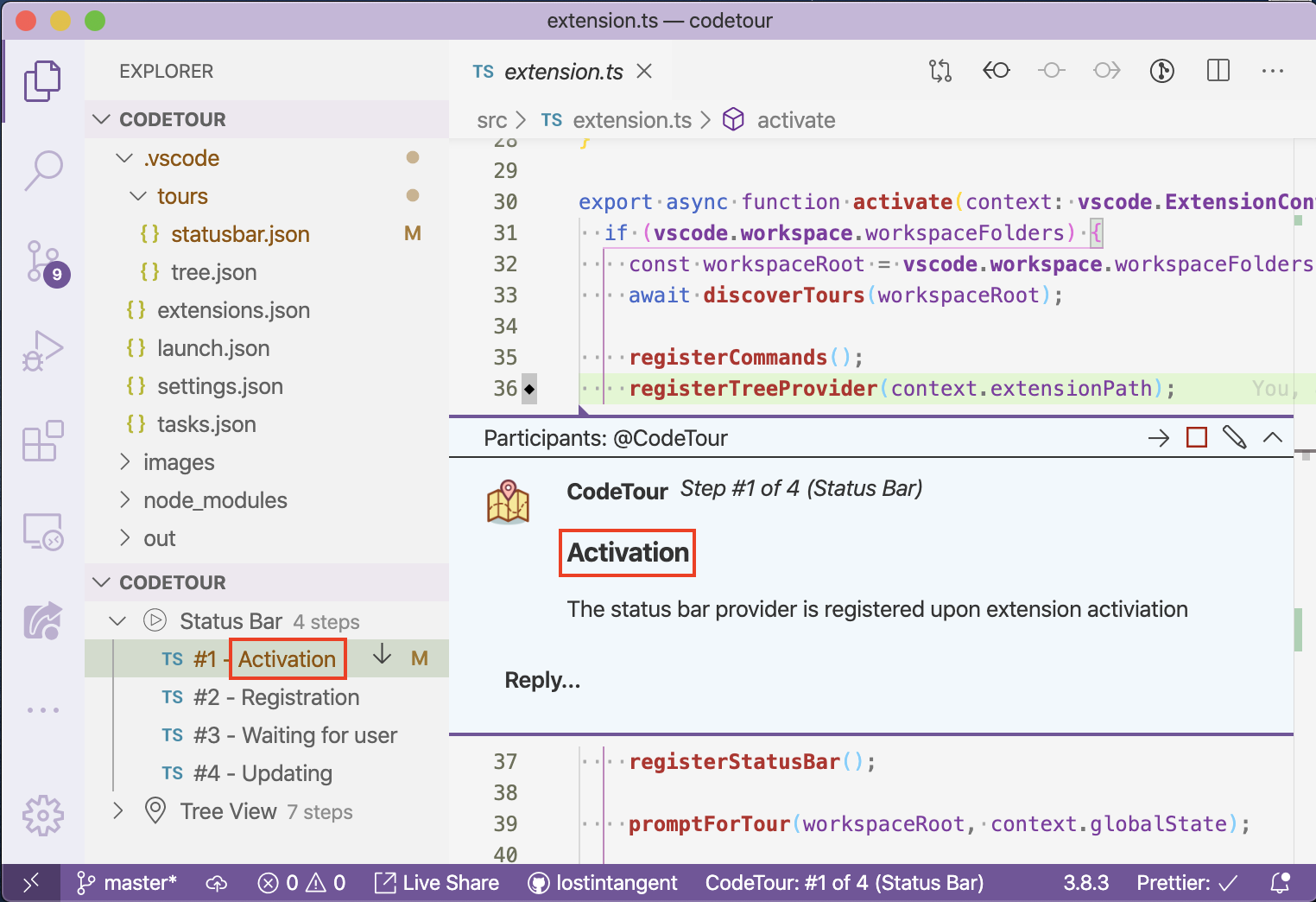
This is not a fancy demo tool or an onboarding-only gimmick. With the right structure, CodeTour is the missing artifact your team needs to convert code review from a cognitive-tax event into a learning event.
Below is the framework I use with engineering teams that need to ship faster without letting review quality collapse. I will show you how to generalize it for any stack, including the part your IDE won't tell you: the "Risk" and "Because" steps of the tour should rarely be written by a human. They should be written by the coding agent that just produced the diff, while it still remembers what it was thinking.
The Review Tour Framework
A PR is a story. The current default - an alphabetical list of changed files - is the table of contents without the chapters. Your reviewer opens the diff, sees 10 files, and has no idea which 3 contain the actual logic change. They read all 10 because they cannot tell. This wastes working memory on syntax and styling, exactly the failure mode Dunning-Kruger predicts will produce a confident-wrong approval.
To make CodeTour work as a deliberate workflow tool, you must enforce a strict narrative structure on the tour file. Without an opening, the reviewer's attention immediately falls to trivial syntax nits. Without a closing, they walk away knowing what changed, but not why. Without an interior structure, each step becomes an essay and the reviewer drops out mid-tour.
Step 1: Gate the requirement
Do not mandate CodeTours for every PR. That is how you turn a high-leverage tool into process debt and mandatory time wasters will just increase the load instead of reducing it.
Require a CodeTour only when the change introduces complex or non-obvious logic that requires explanation. Skip for simple syntax changes, mechanical refactors, or self-explanatory fixes.
Step 2: The Four Beats of a Review Tour
A diff shows what changed line-by-line; a tour builds the narrative arc that leads to the "Aha!" moment. Every review tour must follow four mandatory beats:
| Beat | Step Type | Purpose | What the Reviewer Walks Away With |
|---|---|---|---|
| 1. Opening Stakes | Content step (no file) | Set the real-world risk or opportunity. | "If this change doesn't land, X breaks in production." |
| 2. Journey Preview | Content step (no file) | Map out the logical flow of the change—what moved, where it went, and why. | "I have a clear mental map of the flow before I touch any code." |
| 3 to N. Artifact Steps | File step + selection/pattern | Walk through the code line-by-line. One idea per step. | "I just saw the exact chunk of logic that handles Y." |
| N+1. Closing AHA | Content step + >> commands |
Connect all the dots into the final "Aha!" moment and provide the green test proof. | "Now I get how it all clicks together—and here is the command proving it works." |
The Narrative Golden Rules:
- Beat 1 sets the problem. Never start with a list of modified files; start with why the PR exists.
- Beat 2 sets the mental map. Tell the reviewer what transformed from point A to point B so they aren't guessing where the tour is taking them.
- Beat N+1 creates the "Aha!" moment. Re-bind the opening stake to the code you just showed them, then give them a runnable command (
>> pnpm test) so they can verify the fix in one click.
Step 3: Author to the per-step micro-rhythm
The arc gives structure. The micro-rhythm gives each step predictable cognitive weight, so the reviewer's working memory never has to suddenly hold a 400-word essay.
For every artifact step in the tour, follow this exact rhythm:
1. Title ────── plot point       (e.g. "The wrapper stays synchronous")
2. Idea ────── one-sentence claim in plain English
3. Look at ─── exact chunk       (3–15 lines, or a `pattern` token, or a `selection` range)
4. Because ─── why this chunk ties back to the opening stake (one short paragraph)
5. Risk ────── one or two bullets: what would break if this chunk is wrong
6. Next ────── forward cross-reference to the next step
Three escalation rules make or break the rhythm:
- If you cannot answer "because…" in one short paragraph, you have two ideas in one step. Split. Cross-reference the second.
- If you cannot name "risk…" in one or two bullets, the chunk is too wide. Narrow the
selectionor break the step. - If the "Look at" line points at a class declaration without showing what is inside, narrow it to the method or block that proves the claim.
This is the cadence your reviewer reads at, so it cannot be longer than what fits in one focused glance.
Step 4: Validation: Take Your Own Tour First
A broken tour is worse than no tour. Trust in the workflow evaporates the moment a reviewer opens a step and the line numbers are shifted or the explanation makes no sense.
Before requesting review, open your IDE and run through the tour yourself from start to finish. At a minimum, you verify the anchors work and the flow makes sense. In the best case—and this happens surprisingly often—explaining your own logic forces you to catch a hidden bug or edge case before anyone else sees it.
If the tour feels tedious or confusing to you, it will be twice as painful for your reviewer. Fix it or regenerate it before pushing.
How to Roll This Out With Zero Custom Tooling
You do not need to write infrastructure to start using this. Here is the literal sequence I have teams run on day one.
Author side - what the engineer does for a complex PR
- Identify the stake before opening the PR. Write one sentence: "If this change doesn't land, what user-visible thing breaks or improves?" If you can't write it in one sentence, the change isn't ready for review.
- Group files into 3–5 conceptual artifacts. Not folders, not packages - ideas. A refund flow change involves a rule, a calculator, a webhook emitter, and a guard clause. That's four artifacts, not fifteen files.
- Pick the smallest code chunk per artifact that proves the sub-claim. Usually 3–15 lines. Use CodeTour's
linerange,selection, orpattern- whichever survives the next small diff cleanly. (Pattern-anchored steps are more drift-resistant than raw line numbers.) - Write the tour file in markdown-with-frontmatter that matches the CodeTour schema. Save under
.tours/<date or id>-<ticket-slug>.tour(or whatever your team convention is). Set VS Code'scodetour.customTourDirectoryto that path in.vscode/settings.jsonso the tour appears in the CodeTour tree without being moved. - Run the four validation gates before requesting review. Title is a plot point, not a file. Risk bullets exist. Pattern matches once. Closing command runs green.
- Render the tour from your editor, open the IDE yourself, and read through it cold. If you wouldn't review your own PR using this tour, the tour is not done.
Reviewer Side: When the PR Arrives
- Open & Start: Click
CodeTour: Start Tourinside your IDE. - Follow the Micro-Rhythm: Read each step in context: Idea → Look at → Because → Risk.
- Hit the "Aha!" Moment: Reach the closing step and run the embedded
>> testcommand to verify the proof directly in your terminal. - Audit the Diff Last: Briefly scan the raw diff only for surface-level typos or formatting—the tour already established the architecture.
Code review stops being a forensic investigation of a diff and becomes a 3-minute guided documentary. You don't just ship faster—you actually know what you merged.
Your Coding Agent Should Author the Tour
To make the framework concrete, here is a generalized workflow for a coding agent:
# Review Tour Workflow

Generate an editor-native CodeTour walkthrough for uncommitted or staged changes. A review tour is a narrative documentary—not an alphabetical diff walk—designed to give reviewers immediate mental alignment on complex architectural intent.

## Phase 1: Context & Diff Harvesting
Collect active changes and context before authoring any steps:
1. **Capture Code State:**
    - Run `git status --short`
    - Run `git diff --stat`
    - Run `git diff` (or `git diff --cached`)
2. **Harvest Context:**
    - Inspect related feature information
    - Run local tests to understand intended coverage.
3. **Extract 3 Core Data Points:**
    - **Stake:** The single-sentence user-visible goal or risk being solved.
    - **Sub-Ideas:** 3–5 core logical concepts required to satisfy the stake (one code chunk per idea).
    - **Proof:** The exact test command that validates the changes end-to-end.

## Phase 2: The Narrative Arc (4 Mandatory Beats)

|**Beat**|**Step Type**|**Purpose & Outcome**|
|---|---|---|
|**1. Opening Stakes**|Content step (no file)|Name the user-visible risk or opportunity. _"If this doesn't land, X breaks in production."_|
|**2. Journey Preview**|Content step (no file)|Map out the logical flow—what moved, where it went, and why—before looking at code.|
|**3-N. Artifact Steps**|File step + `selection` / `pattern`|Walk through code step-by-step. **One idea per step.**|
|**N+1. Closing AHA**|Content step + `>>` commands|Connect all dots into the final "Aha!" moment and embed runnable green test commands.|

## Phase 3: Tour Construction & Micro-Rhythm

1. **File Location:** Save to `.tours/<YYYY-MM-DD>-<slug>.tour`. (Ensure `.vscode/settings.json` has `"codetour.customTourDirectory": ".tours"`).
2. **Tour Metadata:**
    - `title`: Short imperative (e.g., `Review: tax calculation kernel`).
    - `isPrimary`: `false`
    - `stepMarker`: `"REVIEW"`
3. **Micro-Rhythm per Artifact Step:**
    Write every step description using this 6-part rhythm:
    - **Title:** Plot point, not filename.
    - **Idea:** The sub-claim in one clear sentence.
    - **Look At:** Exact chunk (3–15 line `selection` or anchor `pattern`).
    - **Because:** Why this chunk proves the sub-claim and connects back to the opening stake.
    - **Risk:** 1–2 bullet points on what breaks if this chunk is wrong.
    - **Next:** Forward narrative link.
4. **Closing Step:** Embed runnable terminal commands using `>> <command>` blocks for 1-click execution in VS Code.

## Phase 4: Validation

Validate the `.tour` file before delivery:
1. **Schema Check:** Validate JSON syntax and structure against the official schema:
    `[https://raw.githubusercontent.com/vsls-contrib/codetour/main/schema.json](https://raw.githubusercontent.com/vsls-contrib/codetour/main/schema.json)`
2. **Anchor Resolution:** Ensure every `file` path exists and every `pattern` matches exactly once in target files.
The narrative framework above is exactly the format your AI coding agent is best at producing - because the agent already has every insight required to write it. When Claude Code, Cursor, Codex, Cline, or any equivalent agentic harness finishes a multi-file task, its working context contains:
- The original user-visible stake it was solving
- The 3–5 architectural decisions it considered and rejected
- The exact code chunks where each decision lives
- The verification command that proves the task succeeded
That context window is closed the moment the task ends. Eight hours later, the developer (and the agent, on the next session) has lost the "why" entirely. What remains is the diff - and the diff is the worst possible artifact for explaining why.
Instruct your coding agent to emit a CodeTour file as part of its task completion, not after. The tour generation happens while the agent's reasoning is still in working memory. The "Risk" bullets are written from the agent's knowledge of edge cases it considered. The "Because" sentences tie back to the original stake because the agent just spent the last 10 minutes solving that exact stake. The closing >> command is the actual command the agent ran on its last verification pass.
This is the strongest counter to the real Dunning-Kruger risk in AI-assisted code review: a confident reviewer rubber-stamping an agent-generated diff they did not actually understand. A coding agent that also produces the Risk bullets and Because sentences forces the reasoning to exist in the artifact itself. The reviewer can audit the reasoning without having to reverse-engineer 200 lines. If the agent's reasoning was wrong, the reviewer will spot it at Risk-step 3 instead of at production incident 47.
For teams running outside the editor - PRs reviewed in the GitHub web UI, for example - CodeTour also exports to a self-contained file (CodeTour: Export Tour)) that can be attached to a PR description or pasted into a review comment. The cognitive benefit is identical; only the rendering surface changes.
Implementation Costs and Tradeoffs (Honest Version)
This section is the part I have to talk teams out of skipping. None of these are dealbreakers, but pretending they don't exist makes the rollout fail.
"Doesn't this add author overhead?"
Yes, The framework above takes roughly 30 seconds for a coding agent to apply to a PR they have just finished coding.
"Aren't AI-generated tours just cargo culting the format?"
This is the sharpest objection and the one most worth answering. A bad tour is worse than no tour. A tour with file-named titles instead of plot points, with no Because, with fabricated Risk bullets, will erode reviewer trust faster than plain diffs ever did.
This is why the developer should always go through the tour themselves.
Developers that skip validation will produce tours that look correct but contain broken anchors, and they will lose the workflow within a month.
"Should I make tours required for every PR?"
No. Tours are required when cognitive load is threatened: cross-package changes, new architectural modules, handoffs to reviewers without context, or PRs that map to a feature ticket with an implementation log.
A 10-line bug fix doesn't need a tour for the most part. A 12-file refactor or a new feature across three packages absolutely does. The threshold lives at "would a competent reviewer fail to reverse-engineer the architectural intent from the alphabetical diff alone in a short time?" If yes → tour. If no → no tour.
What to Do This Week
- Install CodeTour in your editor: VS Code marketplace, JetBrains plugin. Source on GitHub. No configuration required to start.
- Pick one upcoming PR you would describe as "the reviewer will need to know why we did this." Instruct your coding agent to generate a tour using the framework in this article. Walk through it yourself before requesting review.
- Review one tour a week with your team. Show the good ones and the bad ones. Calibrate on the rhythm and beat structure in the workflow so your agent will improve.
Within a sprint, you will see two immediate shifts: regressions drop as authors catch edge cases while walking their own tours, and PR dread disappears because reviewing code stops feeling like a high-friction chore.
In the short term, overall review time won't magically collapse while developers adapt to authoring tours. But as trust in the workflow builds, the tour becomes where most of the review time is actually spent. Once the reviewer grasps the narrative arc, auditing the raw diff transforms from a grueling exercise in reverse-engineering into a fast, effortless sanity check. That is the true ROI curve.
Sources and References
- CodeTour on the VS Code Marketplace - installation, configuration, schema reference
- microsoft/codetour on GitHub - open-source repo, JSON schema, export tooling, editor integrations
- CodeTour: VS Code extension allows you to produce interactive guides, assessments, and walkthroughs - Microsoft Tech Community - primary documentation on interactive guided walkthroughs and authoring patterns
- CodeTour for JetBrains IDEs - IntelliJ, WebStorm, PyCharm, GoLand, etc.
- Dunning-Kruger effect - Wikipedia - background on why low-context reviews produce confident-wrong approvals
Disclosure: AI tools were used to assist in writing, structuring, and editing this content under human supervision and editorial review.