300x250 AD TOP

Search This Blog

Pages

Paling Dilihat

Powered by Blogger.

Saturday, March 31, 2018

Practical Sensing - Physical

We, as humans, are so used to know who we are and where we are that we sometimes forget that it comes at a cost, a person sees where they are, they have an awareness (or general awareness) of their location in a room or on the street, they can also see a step (or feel if one is blind) and eventually know where obstacles are, get from a place to place and plan routes around obstacles.

https://pixabay.com/en/eye-internet-forward-vision-669157/

What can machines do? 

This is a quick introduction about sensors, what are the available options for a beginner maker/developer.

Physical Sensing

"Sensors" such as switches, magnetic, sound (or ultrasonic), pressure, temperature, flexing (or bending), shear (or weight), piezo, gas, capacitive and resistive sensors have been around the block, simple vacuum robots have some of them, cars have them (not necessarily self driving ones, see parking sensors) and even old refrigerators have them (someone has to turn on the light when you're hungry at 4AM).

Switches

Switches and buttons come in all shapes and sizes but the mechanical principle is the same, there are two (or more) spaced conductors, when a force is applied, one of the conductors (or a third) is moving toward them and makes a connection.

https://www.omron-ecb.co.kr/web/en/special/switch/basic02-05

Other types of switches can be limit, rocker, toggle, DIP, push buttons, thumbwheels and more, but the principle is the same applied in different ways and are represented very similarly.

https://www.edrawsoft.com/switch-symbols.php
Among these mechanic switches there are also simple tilt switches, they work by the same principle where a metal ball is the connection point.


Mercury tilt switches got infamous in the movies for less favoring reasons

Source


So what are switches and buttons good for?

Sensing mechanical contact, bumping into walls, rotational forces, etc'

What are they not good for?

Anything that requires precision and detection of the amount of pressure, they are on-off, nothing more.

Magnetic

A magnetic sensor is a type of sensor capable of sensing magnetic fields, magnetic fields are a directional field but the direction can not always be sensed, for example a reed switch will close (N.O) or open (N.C) based on the presence of magnetic field. We can also sense the presence and direction of a magnetic field with Hall Effect sensors (1D) and electronic compass if we require a 3D sensing of electric fields.


http://www.memsjournal.com/2011/02/motion-sensing-in-the-iphone-4-electronic-compass.html
These electronic compasses are so cool and sensitive you can use them to visualize a magnetic field!

Since hall sensors are so inexpensive and accurate, they can be used for rotational speed detection (odometry) and water/air flow sensors.


The principle is the same for most speed sensors, a moving part and a detector.

Source


Another very interesting application of hall sensor is 3D absolute sensing like the MLX90333:

Source


Another type of magnetic sensing is induction sensing, this is what metal detectors do, the way they work is by generating a strong magnetic field and detecting changes in the feedback, induction sensors are used in 3D printers to detect the build plate, they are pretty accurate and repeatable, but there are better sensors for that purpose as well and they are limited by the fact that they can only sense metals.

Common usages:
Neato Boundary Sensor


So what are they good for?
The reed switches are used as an on-off switch when a magnet is near by, the common example are windows and doors sensors for alarms. The hall effect sensors are used to precisely detect a magnetic object and the compasses are used to orient against magnetic north or artificial magnetic field.

What are they not good for?
If the environment is magnetically "dirty", many motors and magnets, both the hall effect and the compass are going to have a hard time "locking", also, electronic compasses are relatively slow, so they can not be used to keep the orientation for a moving object, for that purpose they are combined with accelerometers and gyros and their data is combined (or "fused" - see sensor fusion) to keep the robot oriented until the compass catches on.

Sound

Sound has very interesting properties with regard to robots, it bounces easily, its travelling relatively slow and sound sensors are abundant (microphones for example).

These leads us to a very simple implementation: distance sensors, they send a ping, wait for the response and report the time it took, Mechatronics has a nice tutorial.

Another very interesting usage is direction detection, I've seen 3 mic arrays, 6 mic arrays and they come with SDKs and can do noise reduction and direction detection.


Another interesting use for ultrasonic sound is indoor navigation, in theory, one can triangulate the source of a sound pulse by the time it takes to get to the transceivers.

Thanks to Marvelmind its no longer a theory:


Common usage would be distance sensors, atomizers, voice commands.

So what is it good for?

When you need to detect distance to a flat surface (rememebr, sound bounces..), when you need to reduce noise in a noisy environment or when you need to detect the direction of where the sound is coming from.

What is it not good for?

When the surfaces are not perpendicular to the sensor, sound will bounce all over the place, you should be thankful for any reading.

Interesting libraries:

Pressure

Pressure sensors are useful for many things, for hydraulic systems they can detect leaks, for water systems they can detect presence or water pump quality or even regulating pressure with a PID loop.

Water Pressure Sensor


Water pressure sensors can detect depth in submersible robots.

300m Depth/Pressure Sensor


Air Pressure sensors are also very useful for weather stations as they can detect weather fronts and predict rain.

Air Pressure sensors can also help multi-rotors keep a certain height, not accurately though, but good enough. Just don't count on them to work on bad weather, I've seen a multi-rotor drop 10 meters on a bad weather day and go back up in a blink of an eye, you can't blame the electronics..

A common type of air pressure sensor is the BMP280:

Air Pressure sensors are also used to detect speed in aircrafts.

All pressure sensors measure from a certain reference point, gauge, absolute and differential are relative and you should know what you need.

Make sure the pressure sensor is suitable for your medium and amount of stress its going to take, note the breakdown pressure so no one will lose an eye/finger and if dealing with high pressure, a suitable burst valve is always recommended.

Temperature

Temperature sensors are useful in cases when you need to know the temperature, for example, is your motor running hot? did the water boil already? is the oil too hot? is the printer's hotend at the right temperature? is it hot outside?

Like all other sensors, temperature sensors come in different flavors, but they divide into 2 groups: conduction and radiation sensors.

A common air/weather convection temperature sensor is the DHT11 and DHT22, these are very cheap:


A common type of conduction temperature sensor is the NTC 100k thermistor
Another common type of sensor is the contact-less IR temperature sensor, Melexis makes some of them:

BTW, the same principle applies for IR cameras, which produce these cool images:


Two consumer grade companies makes these sensors, Seek and FLIR, both cost around $200 for the cheap versions and of-curse you can get sensors only, but that is a different adventure.


Another kind of temperature sensor is the thermostats, which can be used for thermal protection, no sensing, just turn on the fan when its too hot, or turn off the power. they are not accurate but they do a good job for their designed purpose.

I've used the KSD9700 to quiet down a power supply that had a fan always on:


Lastly the PTC thermistors, they are a type of resistor that when they get too hot, their resistance jumps significantly, they are used to protect over-current and are regarded as self resetting fuse as the system cools off, the power returns to normal.

This is a nice kit to get started:


Flexing 

Flexing (or bending) sensors are basically resistors that change their resistance when they are bent, they are great for human interaction since, if you think about it, we have many joints that flex and tracking these flexing movements is not trivial by other means, so gloves, sleeves, tights, if it bends, you can detect it with these little sensors.

Be careful though, these sensors are not cheap and the material melts away if attempting to solder it, you might be able to fix it with conductive silver paint, avoid heat as much as possible and avoid rubbing it in the exposed areas.

Here's a 2.2" flex sensor, they come at various lengths:

Shear / Load Cell / Weight

Shear beam, Load Cells and Weight sensors all come fromt he same family of sensors, they change resistance according to the deformation that is sensed in the metal. They are used in scales and testing machines. One might want to use them to test a load on a mechanical arm for example so they can stop a motor if the weight becomes dangerous or avoid breaking something if an arm is attempting to open a door.

Here's an example of a 10KG weight sensor:

Piezo

Piezo sensors have many uses, a piezo crystal is either flexing when power is applied to it, thus can make a sound or it can generate power when a force is applied to it. due to these features piezo are versatile.

Piezo have been used as microphones, especially where vibration plays a big role, for example, as a guitar pickup microphone.

Source
Wait what? guitars? aren't we talking about robotics? well, lets repurpose these sensors a bit, say you have a motor running, 24/7, that motor have bearings and like all bearings they wear off, you can claim that if your motor is running 24/7 you can calculate the service times, but what happens if the motor is under load only a few times a day and this changes the service time significantly. by detecting the vibrations coming off the motor, you can predict mechanical failure.

Since piezo generate power on change, they can be used to detect "knocks" (or bumps or clicks) or even heartbeat!

Gas

Gas sensors mostly split into two groups, spectroscopic sensing and chemical reaction sensing. while spectroscopic have a very long life, the chemical reaction ones have a relatively short lifespan and the catalyst will eventually deplete and no longer detect anything or detection accuracy will be low enough to make it useless.

Another type gas sensor is dust sensor, such as GP2Y1014AU0F:

Source
CO2 sensors for example, come in a few different ways, for example, chemical (MG811) and spectroscopic (MH-Z19):

MH-Z19 - NDIR sensor
MG811 - Chemical Sensor

Other types of sensors are 
Combustible Gas ( LPG, Propane, Hydrogen, Methane and other combustible steam) - MQ-2
Alcohol/Ethanol and Benzine - MQ-3
Combustible gas (Methane, Propane and Butane) - MQ-4
LPG, natural gas , town gas - MQ-5
LPG, iso-butane, propane - MQ-6
CO - MQ-7
Hydrogen - MQ-8
LPG, CO, and Methane - MQ-9
Ozone - MQ131
Ammonia, nitrogen oxide, alcohols, aromatic compounds, sulfide and smoke - MQ-135
Hydrogen sulfide - MQ136
Ammonia - MQ137 
Toluene, Acetone, Ethanol and Formaldehyde - MQ138 
Freon - MQ139
Methane LPG, i-butane, Propane - MQ-214
Alcohol - MQ303A  / MQ303B 
CO2 Low Power - MG-812

Natural gas, LPG, Coal gas, alkane ect combustible gas, and gasoline, Alcohol, ketone, benzene ect organic solvent - MC113

CO2 - MG811

Methane - MP7217
Alcohol,smoke,formaldehyde, toluene, acetone, benzene, lighter gas, paint - MP901
Formaldehyde - ME3M-CH2O
Ammonia - ME3-NH


Organic Solvent Vapors - TGS822
Carbon Monoxide - TGS2442 
Air Contaminants - hydrogen and carbon monoxide - TGS2600
Air Contaminants - odorous gases such as ammonia and H2S - TGS2602
Air Contaminants - odorous gases such as amine-series and sulfurous odors - TGS2603
LP gas - TGS2610
Methane - TGS2611
Solvent Vapors - TGS2620
Carbon Monoxide - TGS2442
Carbon Dioxide - TGS4161 
Carbon Monoxide - TGS5042

VOCs gases (toluene, formaldehyde, benzene, ect.) - MS1100

Methane Butane Hydrogen - MR511 

Most combustible gases and vapors  - CLE-0951-400
Nitric Oxide - 4NO-2000

Oxygen - O2-A2 / AO2 / 2FO-N / KE-25 / ZE07-CO / ME2-O2 ME3-O2 / 4OXV O2 /  ME3-C2H4O / OOM201 

So there's practically a sensor for almost any need, most of them are decently priced.

Resistive

In general, resistive sensors are a large class of sensors, among them are the previously written topics of load cells, flexing, temperature and various pressure sensors, they property of the material changes conductivity based on the forces and temperatures applied on them, some of these sensors need some kind of temperature compensation as resistance changes with temperature as well.

Other types of resistive sensors are resistive touch screens, which work by changing the resistance with the force and place the mechanical stress is applied, that's why they work best with a stylus since a finger might apply force on more than a small location, thus changing the sensed resistance and eventually leading to bad localization. Another problem with resistive touch screens is temperature which affects accuracy.

In the end resistive touch screens were abandoned but that technology is not completely useless, here's an example for a foot pressure point sensor:


Resistive sensors can also detect rotation angle, for example, potentiometers, and slide, as slide potentiometers.

Analog servo motors use potentiometers, but the same principle applies, you can use a multi turn potentiometer to achieve multiple turn servo!

Source
Linear Servo


Capacitive

Capacitive sensors work by detecting conductivity different than air which makes them useful for many things and they don't suffer from the same problems resistance sensors.

Common usage is touchpads, phone screens, touch buttons, capacitive proximity sensors and capacitive soil moisture sensor which doesn't corrode as easily as resistive ones.

Capacitive Touchpad
http://www.cirque.com/capacitive-touch/
Touch Sensor

Soil Moisture Sensor
Proximity Sensor


Current/Voltage

Current sensors/voltage sensors are very important to keep a limited system within the power supply's boundaries or keeping a Lithium battery alive when the power runs out, so the battery voltage won't get below 3.2v (or its limit) per cell.

DC Voltage sensing can use a very simple voltage divider. and AC Voltage can use the same principle except that we need to put a rectifier in front of it.
Source
Current sensing on AC works by induction, while DC current sensor works by measuring the voltage across a very low reistance component, such as a short wire, a 0.1/0.001 ohm resistor or dedicated sensors such as ACS758.

Non-invasive AC current sensor

100Amp AC/DC Current Sensor Module Board, based on ACS758

Biological

Biological sensors are useful for detecting or authenticating a person, so if your robot depends on someone's pulse or blood oxygen level, you can use a pulse oximeter for that, its a non invasive sensor that measures the difference between IR and red light absorbance of skin.

MAX30100 Pulse Oximeter


Another thing someone might want to sense is muscle/heart/brain signals, which can be done with EMG/ECG/EEG sensors.
Muscle Signal EMG Sensor
ECG module AD8232
8bit EEG brain wave module -8 Channel 

Fingerprints, lately it seems fingerprint sensors are all over the place, you can get them very cheaply and in various sizes. A very fun project I've seen someone do is build thor's hammer with fingerprint reader.

FPM10A Fingerprint Reader Sensor


Tags:

Wednesday, March 7, 2018

RTree v1.1.0

RTree was one of the first projects I've contributed to open source, its the seed that started this blog and a tool for a past thought.


That being said, it was written for .NET framework and while looking at nuget stats, once a day is no where near popular, its already accumulating dust, doesn't support threads or .net core.

So, time for an upgrade.

The project has been converted to .NET Standard 2.0

Added support for multithreading by removing a limitation and adding ReaderWriterLock and fixing a bug that makes deletes impossible.

https://www.nuget.org/packages/RTree/


Tags:

Tuesday, January 23, 2018

Reusing a Laptop Camera

A few months ago I came across this instructable, its showing how to reuse a laptop camera module as a usb device, which some of them use. so later when I've decided to clean up and get rid of old and defunct laptops, I've found two camera modules and attempted to repurpose them.

The module's quality is nothing to be impressed by but they are UVC compatible, which should be good for linux use as well, but I'll test them at a later time.

The connectors seem like a standard, the following diagram is from the instructable, one of my modules even had the pinouts on the silkscreen!


While my devices are:


I've had a few USB connectors laying around, so I've looked up the pinouts


Soldered the connectors


and tested the cameras are not a short circuit risk with a USB tester


The first showed up as VID_05E3&PID_0505, which is a Genesys Logic USB2.0 PC Camera, its power consumption is around 80ma.

The second one showed up as VID_04F2&PID_B106, which is a Chicony® USB M UVC WebCam, its power consumption is around 110ma.

Next, testing them with an Orange PI....

Tags: ,

Wednesday, January 3, 2018

IDesign - The Architect's Master Class - Review

I've had the privilege of taking Juval Lowy's - The Architect's Master Class last week and while I've been a Senior Software Developer for the last 10 years, I've also wore the architect's hat in some of my past positions.


Juval takes the class on a roller coaster of  realizations, explaining the difference between computer science and software engineering which requires an understanding of what engineering really is about as well as the business aspects of change and growth and what's the architect's role in a software project that is on time, on budget while maintaining high quality.

I don't consider myself easily persuaded, I do believe that I learned some new mental and practical tools. Some participants complained that the class was a bit overly dramatic but I think it was on purpose, most if not all participants listened to Juval for a week from 9:00 until 20:30 with only small breaks for recuperation, lunch, coffee and the occasional cookie, so "drama" did the trick.

The first 4 days looked like they were planned to break habits, open the participants mind to new (or old to be precise, see David Parnas's On the criteria to be used in decomposing systemsinto modules,  and Designing Software for Ease of Extension and Contraction), and eventually present Juval's arguments towards a proper software engineering project planning and execution, e.g. "The Method".

Some of the quotes that stuck:

"The only way for a project to be on time, on budget and on quality at the end is to be on time, on budget and on quality throughout"

"The purpose of testing is to prove something doesn't work"

"Being Agile, not DOING Agile"

"Agile forgot the Andon Cord"

"Gold Plating"

"Features are the result of integration, not implementation"

But I won't ruin it for you, if you have the time, budget and mental readiness, you should go, you don't have to do anything about it... but you'll probably learn a thing or two and if not, the interaction with other architects or aspiring architects will probably be fruitful.


Further Reading:
http://www.cool-man.org/software-architecture
https://blog.acolyer.org/2016/10/31/designing-software-for-ease-of-extension-and-contraction/
https://www.youtube.com/channel/UCiac1nub33BUnwxxeCmY2uQ

Tags:

Saturday, December 16, 2017

Machine Learning Automatic License Plate Recognition


I'm starting to study deep learning, mostly for fun and curiosity but following tutorials and reading articles is only a first step.


Though I know and programmed multiple languages in the past, somehow deep learning is associated with Python and as someone who likes C like languages it was always a dislike for me, the whole concept of using spaces to control program blocks looked ridiculous to me, but what the hell, lets try to learn it, it makes things a lot less complicated than compiling Tensorflow, Caffe or OpenCV from source and then trying to get them to talk to each-other, where in python these issues have already been solved.

Learning neural networks have been on my mind for quite a while, I've even read a few neurology books to understand the origins of these ideas but only when I've attended GTC Israel 2017 and had the chance for hand-on guided Nvidia DIGITS session I've started to take active interest, though not really achieve anything new for a while.

10 points if you can locate me in this clip


So I thought about a cool project, though I'm not sure what its usefulness is going to be now, so how about recognizing and registering all the vehicle license plates around one's car?

Algorithmic Approach

At first I've tried OpenALPR's approach, finding a large rectangle with multiple rectangles inside it. it works if the license plate is a major object in the image, but not if there are multiple vehicles, not to mention an unstructured scene, like driving on the highway or a mobile camera of some sort, though I might have not implemented it correctly in my code.

Image Segmentation

So the 2nd approach I've thought about is image segmentation. I've been reading a lot about ENet, SegNet and ICNet lately and was eager to try it. and so I've began to look for a Keras model to get things started. But then I realized, I don't necessarily need the localized polygon of the license plate, a bounding box should be more than enough. then I can pass the cropped image to tesseract and get a license plate.

Object Detection


So I've looked up a few object detection models, such as SSD, YOLO, Faster RCNN, R-FCN, RetinaNET and more are being designed as we speak. I've decided to go with YOLO, being biased to it after seeing a demo I liked.

But to train any kind of machine learning model, you need data and lots of it. I've started to look for a license plate dataset but couldn't find anything that has both the images and the polygons... but then I remembered I've seen that in the Cityscapes Dataset there is an unmarked license plate class, so theoretically all I needed to do was generate the right mask/polygons for the training.

I've cloned the basic-yolo-keras repo by Huynh Ngoc Anh, updated it to work with python 3 and ran a training session on the dataset.

Having a laptop, its a bit of a problem to train on it, since its not always on, I need to take it with me etc' etc'. so I've looked for an online solution. eventually I ended up using Azure NC6 machine at $0.90/hour, it has Nvidia K80 with 12GB of RAM so I could increase the batch size to make things run a bit faster, eventually training took less than 24 hours on a ~2400 images, some with more than one sample.


(on my 1050TI, this video was created at about 9fps)

As you can see the license plate should be readable, otherwise it doesn't really detect it, I didn't plan this, so I'm guessing YOLO training is really good or its a side effect of using the Cityscapes Dataset quality.

OCR

My next task was OCRing the license plates so I can get data I can list and log, I've had some experience with tesseract in the past, so I chose to try it this time as well.

Well.. this didn't go as smooth as I wanted... while many license plates are readable by a human, the noise is just too high for tesseract to recognize reliably.

The following video was shot with 4K camera, high shutter speed and high bitrate (SJCAM M20), but the recognition quality has marginally increased.


(creating this video was even slower, the GPU didn't work as hard, but tesseract did a lot of work (CPU), about 1.5fps)

I've had my fun with this project, but I think the next step could be another deep learning  object detection, only this time it should be the license plate numbers in case of Israel in addition, letters - for many others.

If I may guess further, the reason this project was not a complete success is the OCR process, the camera is an action camera, so very wide lens, that means very low resolution for each license plate.


I'm pretty sure further pre-processing effort might raise tesseract's recognition quality, they do look readable. I did discover that Israeli license plates are just too tall for tesseract's english detection, which is somewhat amusing.
If pre-processing doesn't work as desired, this little project has taught me that machine learning can probably do this task as well and probably with high precision.

Source Code

I'm still not ready to publish any python code, I will need to familiarize with more of it before being ready to do so.
In any case, there is nothing new there, the code for building the CityScapes dataset extract is basically just parsing the JSON files and producing VOC format XML, the YOLO code is the code from basic-yolo-keras with some adjustments. and lastly the cleanup code for the license plate is just a simple auto-levels like code on the V channel in HSV.

Conclusion

This was a fun project, I'm sure that with further research it can be a pretty cool and reliable software, using YOLO for license plate detection seemed to work pretty good, perhaps cleaning up the dataset and further optimizing the training and inference processes will make it even better, perhaps using a machine learning based number/letter recognition will make reading the plates more reliable. perhaps it can all be coded with an algorithm rather than a model.... maybe the next thing should be recognizing car maker and color?....


Further Reading:

Speed/accuracy trade-offs for modern convolutional object detectors by Felix Lau
Cityscapes Dataset
ENet: A Deep Neural Network Architecture for Real-Time Semantic Segmentation
SegNet: A Deep Convolutional Encoder-Decoder Architecture for Image Segmentation
ICNet for Real-Time Semantic Segmentation on High-Resolution Images
SSD: Single Shot MultiBox Detector
You Only Look Once: Unified, Real-Time Object Detection
Faster R-CNN: Towards Real-Time Object Detection with Region Proposal Networks
R-FCN: Object Detection via Region-based Fully Convolutional Networks
RetinaNET - Focal Loss for Dense Object Detection

Tags:

Tuesday, December 5, 2017

Flashing ATtiny85 with USBasp and Making a PWM Generator

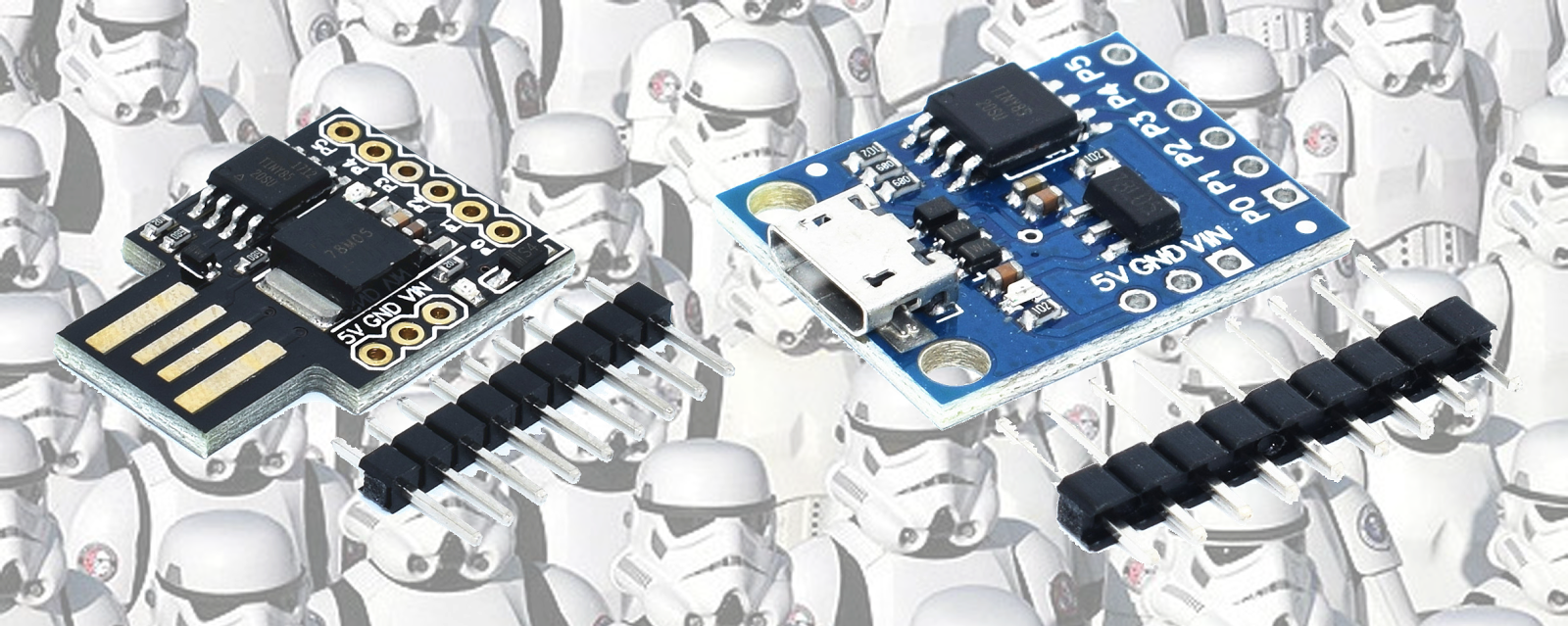
I've ordered a few Digispark clones (originally made by DigiStump) from AliExpress for use in low pinout, low power, tiny projects that don't require much code as they use the ATtiny85. These devices looked very cool and suitable for my needs and the fact that they can be programmed without the cumbersome ISP programmers made it even more appealing (spoiler: the clones did not work properly)


At first I expected them to be able to communicate over USB and expose a com port, which would make programming them even easier but they don't work that way.

Micronucleus

The firmware bootloader is based on micronucleus and the USB interface  is V-USB, it is a firmware/software only implementation of low-speed USB device, so any functionality you wish to implement needs to be in software, even virtual com ports, for examples you can look here.

Something to note about the micronucleus firmware is the 5 seconds startup delay. If you need the device to start up immediately, you'll have to try a different approach where shorting pin 5 to ground enabled programming, otherwise it starts immediately. There is however a solution for it, but I did not test it.

So I've hooked up the Digispark, started the Arduino IDE and loaded blink and...

\micronucleus\2.0a4/launcher -cdigispark --timeout 60 -Uflash:w:Blink.ino.hex:i 
Running Digispark Uploader...
Plug in device now... (will timeout in 60 seconds)
> Please plug in the device ... 
> Press CTRL+C to terminate the program.
> Device is found!
connecting: 16% complete
connecting: 22% complete
connecting: 28% complete
connecting: 33% complete
> Device has firmware version 1.6
> Available space for user applications: 6012 bytes
> Suggested sleep time between sending pages: 8ms
> Whole page count: 94  page size: 64
> Erase function sleep duration: 752ms
parsing: 50% complete
> Erasing the memory ...
erasing: 55% complete
erasing: 60% complete
erasing: 65% complete
> Starting to upload ...
writing: 70% complete
writing: 75% complete
writing: 80% complete
> Starting the user app ...
running: 100% complete
>> Micronucleus done. Thank you!

no dice.

Apparently the clones were flashed with micronucleus but either an old version or wrong fuses.

So.........

Fixing Digispark Clones with USBasp

For a different purpose I've ordered a cheap USBasp 2.0 programmer from AliExpress, although it comes with a firmware already flashed, its using an old usbasp firmware so its vendor id and product id are not compatible with current avrdude which is being used by Arduino.

If you insist on updating the USBasp firmware, you can follow Darell Tan post, which is based on work made by Uwe Zimmermann.

otherwise you can use PROGISP  v1.72 which does a great job.

I've connected the USBasp to the Digispark


First, connect the pins according to this:

MISO <> MISO
MOSI <> MOSI
RST <> PB5
SCK <> SCK
VCC <> VCC
GND <> GND

Next, I've downloaded the lastest micronucleus firmware for ATTiny85 and flashed the bootloader:


- Select the chip as ATTiny85
- Click RD to see it is able to communicate appropriately
- Load the appropriate micronucleus firmware
- Select the fuses according to the documentation.
- Click Auto to flash the bootloader

Note: Note fuse RSTDISBL, You might not be able to use PB5 as its used as external reset pin.

We then retry to flash using Arduino IDE / USB cable and its working!

Running Digispark Uploader...
Plug in device now... (will timeout in 60 seconds)
> Please plug in the device ... 
> Press CTRL+C to terminate the program.
> Device is found!
The upload process has finished.
connecting: 16% complete
connecting: 22% complete
connecting: 28% complete
connecting: 33% complete
> Device has firmware version 2.1
> Device signature: 0x1e930b 
> Available space for user applications: 6522 bytes
> Suggested sleep time between sending pages: 7ms
> Whole page count: 102  page size: 64
> Erase function sleep duration: 714ms
parsing: 50% complete
> Erasing the memory ...
erasing: 55% complete
erasing: 60% complete
erasing: 65% complete
> Starting to upload ...
writing: 70% complete
writing: 75% complete
writing: 80% complete
> Starting the user app ...
running: 100% complete
>> Micronucleus done. Thank you!

ATtiny85 as a PWM generator

I've wanted a decent pwm generator that can display the duty cycle width for diagnosing problems with brushless ESCs and servo motors, so the cheap ones would not do. I've decided to build my own, as always for education and fun.

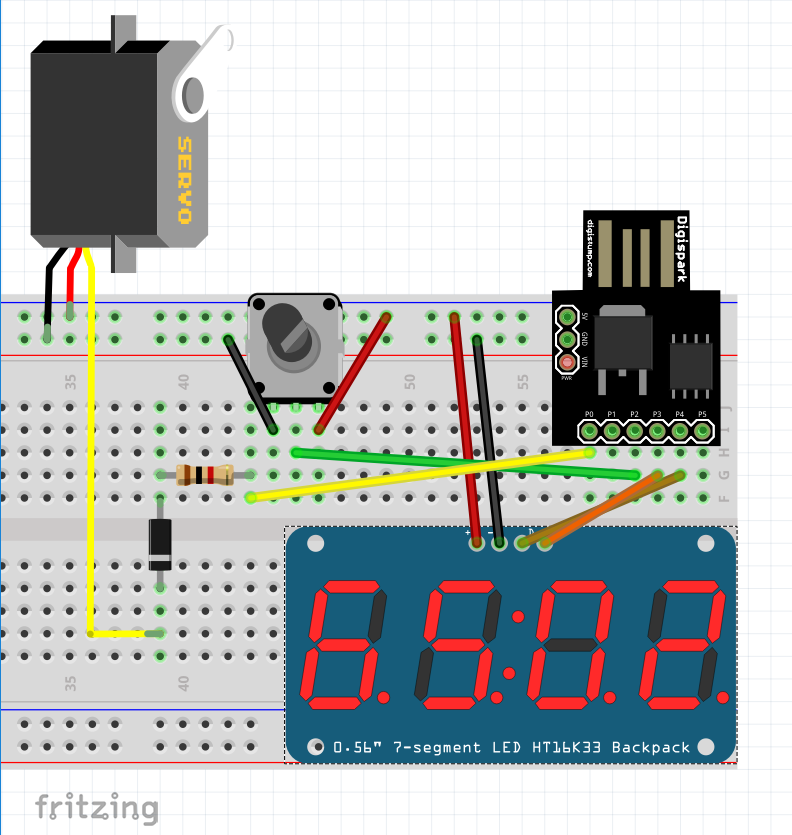
We'll start with the basics, the schematics:


As mentioned previously, the ATtiny85 does not have a dedicated USB port, nor does it have a dedicated serial port, so how does it communicate over USB? It does so with V-USB, which is a software emulation for a USB port/device.

But the USB connection comes at a cost, you'll most likely encounter problems if pins 4-5 (PB3-4) will have any contact with other components. so either flash and test this chip on a breadboard or flash once and forget you did, or just don't use these pins.


So lets start with our PWM generator.


I'm using:
Digispark ATtiny85 Clone - This chip is good enough for this purpose, only drawback is the limited timers.
10k potentiometer - As an analog input for the 10bit ADC, which is then mapped fromo 400-2400us.
TM1637 7 segment 4 digits display - To display the selected duty cycle.
1k resistor and 1N4004 Diode - for output protection, I've just had to replace the ATtiny85 due to feedback from a servo, so its my attempt to protect it.

The source code is very simple, its actually the example from Adafruit SoftServo with display code.

Timer Limitation

The ATtiny85 has a limited timer, which can't be used to control high resolution PWM signal. but Adafruit SoftServo is a good solution for this problem, rather than use the timer to control the PWM directly, it uses the timer to call a function that simulates a PWM signal by writing the pin directly with a delayMicroseconds between.

ADC Noise

At first I've tried to read the potentiometer directly and push an update to the servo, but I got so much noise from the ADC that the servo shaked a lot. I think most if not all ADCs have a noise problem. usually a capacitor and a low pass filter can eliminate some of the noise and while the ATtiny85 has a ADC Noise Reduction Mode, I've resorted to use a simple solution:

long avg = 0;
for (int i = 0; i < 100; i++) {
avg += analogRead(POT_PIN);
}
val = avg / 100;

It will never be complete without a printed enclosure :-)


Further References
- I had to check which vendor/device ids to find out how to use the USBasp first as the device didn't come with any information. so I've used NirSoft's USBLogView to see which device was being plugged in/out.
- I looked into having a virtual com port with these devices, Osamu Tamura @ Recursion Co started AVR-CDC and its emulating virtual com port, but I didn't get around to test it. Two more source code libraries can be found here and here.
- Official USBasp firmware is written by Thomas Fischl

Tags: