


 View Dror Gluska's profile
If this article hurts anyone's copyright, let me know and I'll remove it.
Scalability Rules: 50 Principles for Scaling Web Sites - on Amazon
This book was a nice read, I didn't get overexcited about it.
The book is talking about what can and can't, what should and shouldn't be done to make your application and services easier to scale, I'm including a little summary so you can judge for yourself if you want to read it.
The following is my understanding and summary of the rules and do not completely correspond with the author's, I've omitted a few rules which looked redundant to me.
Rule 1 - Write simple programs, complicated programs are hard to maintain and hard to add scaling logic to.
Rule 2 - Design the program to scale up front, its cheaper than trying to scale a finished product.
Rule 4 - Balance CDNs and DNS lookups.
Rule 5 - Reduce objects, on HTML pages, CSS files, JS files, on page creation, in code etc', remember if an object is being created it also needs to be disposed of.
Rule 6 - Use a single hardware provider, less chance of collision between protocol implementations and standards.
Rule 7 - Horizontally scale, for example, if you're using SOA, create some services and balance the load.
Rule 8 - Split the load of the program to different components.
Rule 11 - Use small abandundly available components rather than big specialized systems, e.g. horizontally scale.
Rule 12 - Design your data to be split across data centers.
Rule 13 - Design your application to utilize what clouds have to offer.
Rule 14 - Use RDBMS where best, NOSQL where best and file-systems where best, don't force one of them to be the other.
Rule 15 - Use firewalls on every important component you're using.
Rule 16 - Use log files, monitor them, analyze them.
Rule 17 - Don't check and read what your program just did, for example, read a file you just wrote or read a transaction you just committed.
Rule 18 - Avoid using redirects, its slowing the user's experience.
Rule 19 - Avoid state constaints.
Rule 21 - Implement expires headers, otherwise caching is limited.
Rule 22,23,24,25,26 - Cache ajax requests, pages, application object, db executions, service calls, use external cache storages like memcache.
Rule 27 - learn from everything, customers, etc'
Rule 28 - Don't rely on QA, the software engineers should do most of the testing, integrate tests into the program.
Rule 29 - Design to rollback your changes, not designing for it could be a disaster.
Rule 30 - Discuss failures, no need to blame, just learn from them.
Rule 31 - Check database relationships and constraints for load, cost, normalization, etc'.
Rule 32 - Use the right database locks where they are needed. page, row, table, schema, etc'.
Rule 33 - Do not use multiphase/two-phase commits.
Rule 34 - Avoid database cursors.
Rule 35 - Do not use select *, get only the data you need.
Rule 36 - Segregate program and data so if one part of the application goes down it doesn't take the whole system with it.
Rule 37 - Single points of failure (SPOFs) will fail, eliminate or plan for it.
Rule 38 - Avoid putting systems/components in series, slows things down and has the potantial of being a domino effect of failure.
Rule 39 - Add the ability to turn on and off features in your application without recompiling the program, if one coponent acts up, you can turn it off without affecting other components until its fixed.
Rule 40 - make everything as stateless as possible.
Rule 41 - Use cookies for state instead of server state.
Rule 42 - Use distributed cache for state, its easier to scale than application state.
Rule 43 - Use async calls instead of sync calls which freeze the program until something else is finished.
Rule 44,45 - Use message buses that can scale and only where the cost to perform the action is higher than the cost to process it via message bus.
Rule 46 - Avoid using 3rd party to scale your application, it might introduce more problems than it will solve.
Rule 48 - Don't use business intelligence in your transactions.
Rule 49 - design your application for monitoring, add logs, performance counters, etc'.
Rule 50 - don't blame anyone, to the user you're the one to blame, for example, if your hardware vendor is giving you a hard time solve it or replace them.
Saturday, December 10, 2011
Thursday, November 3, 2011
Comparing database schemas
WARNING: DBComparer comes with babylon toolbar and can't be removed by conventional ways.
I've considered removing that post because of that but decided on adding a warning instead, to remove the babylon forced installation you'll have to get into firefox, ie and chrome, delete the new search engine and remove the default pages, in firefox you can do about:config, type babylon in the search box and delete all values.
---> Original post below.
So, you've been working on optimizing a database, stored procedures, indexes, views, you changed some of those, deleted a few and created new ones. You wrote on the side everything you did in the development database but somehow when you try to stage everything, you're not getting the desired performance or getting some exceptions about schema not being consistent.
Now what?
Back in the days there was a project on sourceforge that made comparing database schemas a breeze, it was called dabcos. then came SQL 2008 and it stopped working, something about a version not being right. so I wrote a small override. then a new job came and I've lost the override and... no, I didn't have the time to look into it again.
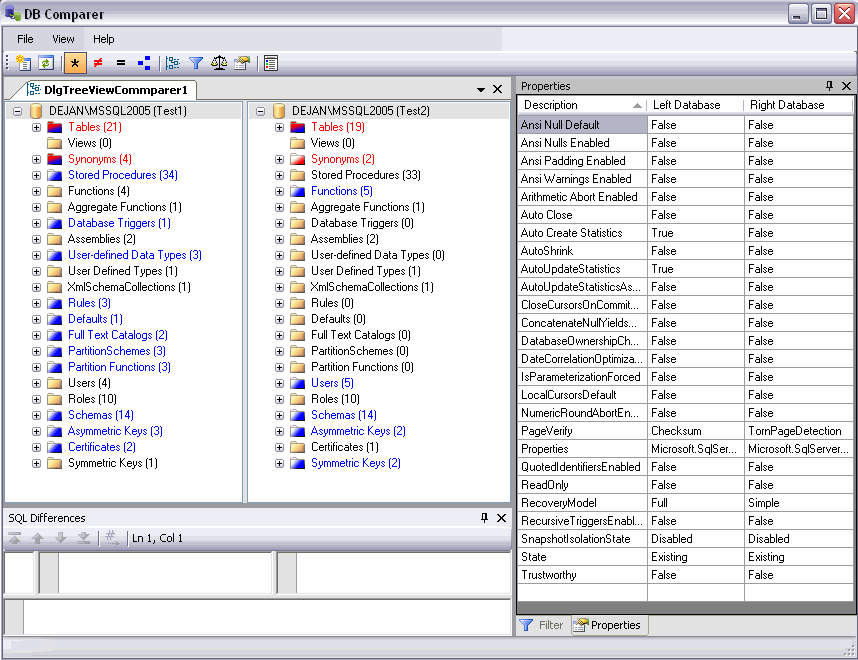
So I've looked for a different option and that option is called DBComparer.

I've considered removing that post because of that but decided on adding a warning instead, to remove the babylon forced installation you'll have to get into firefox, ie and chrome, delete the new search engine and remove the default pages, in firefox you can do about:config, type babylon in the search box and delete all values.
---> Original post below.
So, you've been working on optimizing a database, stored procedures, indexes, views, you changed some of those, deleted a few and created new ones. You wrote on the side everything you did in the development database but somehow when you try to stage everything, you're not getting the desired performance or getting some exceptions about schema not being consistent.
Now what?
Back in the days there was a project on sourceforge that made comparing database schemas a breeze, it was called dabcos. then came SQL 2008 and it stopped working, something about a version not being right. so I wrote a small override. then a new job came and I've lost the override and... no, I didn't have the time to look into it again.
So I've looked for a different option and that option is called DBComparer.
Thursday, July 7, 2011
jQuery general ajax error
Over the years I've collected many code snippets to make programming easier, here's a small one that handles general ajax errors and shows them in a window, you'll need to design your own CSS for this to show properly.
//Attach global juery ajaxerror
$(window).ready(function ()
{
    $(document).ajaxError(function (e, jqxhr, settings, exception)
    {
        showError("Ajax Error - " + exception.toString(), jqxhr.responseText);
    });
});

//Hides the error window
function hideError()
{
    $('#mask').hide();
    $('#errorWindow').hide();
}

//Shows the error window.
function showError(strTitle, strMessage)
{
    //avoid showing an empty ajax message
    if ((strTitle == "Ajax Error - ") && (strMessage == ""))
    {
        return;
    }


    var mask = $('#mask');

    if (mask.length == 0) {
        mask = $('<div id="mask" class="windowMask"></div>');
        $("body").prepend(mask);
    }

    //Get the screen height and width
    var maskHeight = $(document).height();
    var maskWidth = $(window).width();

    //Set height and width to mask to fill up the whole screen
    mask.css({ 'width': maskWidth, 'height': maskHeight });

    //transition effect
    mask.fadeIn(1000);
    mask.fadeTo("slow", 0.8);

    //Get the window height and width
    var winH = $(window).height();
    var winW = $(window).width();

    var errorWindow = $('#errorWindow');
    if (errorWindow.length == 0) {
        errorWindow = $('<div id="errorWindow" class="windowError"></div>');
        $("body").prepend(errorWindow);
    }


    errorWindow.html('<div class="windowHeader">' + strTitle + '</div><div class="windowClose" onclick="hideError();">Close</div>' + '<div class="windowContent">' + strMessage + '</div>');

    //Set the popup window to center
    $(errorWindow).css('top', winH / 2 - $(errorWindow).height() / 2);
    $(errorWindow).css('left', winW / 2 - $(errorWindow).width() / 2);

    //transition effect
    $(errorWindow).fadeIn(2000);
}
Monday, July 4, 2011
Timesheet
One of the drawbacks of having flexible work hours is when forgetting to punch in when you enter the office. later during the week when you try to remember when did you arrive could be hard and I prefer to offload it from myself.
I don't know about you, but usually the first thing I do when I enter the office and go to my seat and unlock the computer and the last thing is locking the computer.
My solution? write an application that logs these events.
So, what can we learn from that application?
SessionSwitch event which passes SessionSwitchReason that can tell you what happened, if the station was locked, unlocked, remote desktop connected, disconnected which was enough for me, I wanted the application to log whenever I lock the station since I don't usually shutdown the computer at the end of the day and i wanted it to log whenever I connect remotely in the morning so if I work from home that day, I can get that logged too.
We can get the currently logged in username with WindowsIdentity.GetCurrent()
Invoking methods asynchronously with MethodInvoker
Accelerating LINQ to objects queries with PLINQ's AsParallel
Interlocked.CompareExchange as a simple way of checking if a method is already executing.
Final thoughts -
I wrote the initial application a long time ago, but I've recently overhauled the the whole application so it will be more presentable, there are still some logical problems, such as the daily calculations and weekly calculations sometimes show incorrect data and there are some extreme situations when something is not logged consistently it will show wrong numbers, but this is good enough for me and not worth spending more time, I'm mostly using the logging function, the calculations are just for getting a rough number.
This is a toy for myself, I just thought to share it, if you need any kind of reliability or tracking, this toy is not for you.

Monday, May 16, 2011
Using Razor Templates In Your Application
We needed a templating engine that will work in a medium trust environment, after reviewing StringTemplate and NVelocity and we came to the conclusion that Razor can do all we need and more, plus it comes with the framework so no need for external dependencies.
You should be aware that Razor is compiling .NET code, it can and will create security breeches in your application if you allow users to change the templates, you can alleviate some of these security issues by segregating your code and giving the razor section access only to the parts it needs, think this through.
The project contains a few important parts.
1. It should have its own TemplatesController, its just an empty controller for the engine to run against.
2. Templates views directory, this is where we're storing the templates for the engine to execute.
3. Templates.cs is where some of the magic happens.
4. For the sake of the demo, I've added a custom WebViewPage called RazorBaseWebViewPage and a SimpleModel.
Templates.cs contains the following:
1. Execute - executes a view against a controller, with ViewData and Model.
2. GetViewName - gets or writes a new template to the templates directory, it uses a hash of the template for the first part of the filename. Same trick as a hash table.
3. RenderView - calls the razor engine's Render. executed from Execute. (Origin)
4. Render - the exposed method to do the actual rendering.
I've ran some analysis on the code's performance, a few places might be helpful to optimize is the GetPartialView and GetViewName are slow.
You can find the project here:
https://github.com/drorgl/ForBlog/tree/master/RazorTemplateDemo
You should be aware that Razor is compiling .NET code, it can and will create security breeches in your application if you allow users to change the templates, you can alleviate some of these security issues by segregating your code and giving the razor section access only to the parts it needs, think this through.
The project contains a few important parts.
1. It should have its own TemplatesController, its just an empty controller for the engine to run against.
2. Templates views directory, this is where we're storing the templates for the engine to execute.
3. Templates.cs is where some of the magic happens.
4. For the sake of the demo, I've added a custom WebViewPage called RazorBaseWebViewPage and a SimpleModel.
Templates.cs contains the following:
1. Execute - executes a view against a controller, with ViewData and Model.
/// <summary>
/// Generates a controller and context, hands them off to be rendered by the view engine and
/// returns the result string
/// </summary>
/// <param name="viewName">Template Name</param>
/// <param name="model">Model for the view</param>
/// <param name="viewData">ViewData</param>
/// <returns>rendered string</returns>
private static string Execute(string viewName, ViewDataDictionary viewData, object model)
{
    var controller = new TemplatesController();
    controller.ControllerContext = new ControllerContext();
    controller.ControllerContext.HttpContext = new HttpContextWrapper(HttpContext.Current);
    controller.RouteData.DataTokens.Add("controller", "Templates");
    controller.RouteData.Values.Add("controller", "Templates");
    controller.ViewData = viewData;
    return RenderView(controller, viewName, model);
}
2. GetViewName - gets or writes a new template to the templates directory, it uses a hash of the template for the first part of the filename. Same trick as a hash table.
/// <summary>
/// Retrieves the view name by template and model
/// </summary>
private static string GetViewName(string template,Type modelType)
{
    //gets the razor template from a text template
    var razortemplate = GetViewContentFromTemplate(template, modelType);

    //gets the hash string from the razor template
    string hashstring = BitConverter.ToString(BitConverter.GetBytes(razortemplate.GetHashCode()));

    //check if view exists in folder
    var files = Directory.GetFiles(ViewDirectory, hashstring + "*.cshtml");
    foreach (var file in files)
    {
        if (File.ReadAllText(file, Encoding.UTF8) == razortemplate)
            return Path.GetFileNameWithoutExtension(file);
    }

    //if not, add it
    string filename = Path.Combine(ViewDirectory, hashstring + "_" + Guid.NewGuid().ToString() + ".cshtml");
    File.WriteAllText(filename, razortemplate,Encoding.UTF8);

    return Path.GetFileNameWithoutExtension(filename);
}
3. RenderView - calls the razor engine's Render. executed from Execute. (Origin)
/// <summary>
/// Renders a PartialView to String
/// </summary>
private static string RenderView(Controller controller, string viewName, object model)
{
    //origin http://craftycodeblog.com/2010/05/15/asp-net-mvc-render-partial-view-to-string/
    if (string.IsNullOrEmpty(viewName))
    {
        return string.Empty;
    }

    controller.ViewData.Model = model;
    try
    {
        StringBuilder sb = new StringBuilder();
        using (StringWriter sw = new StringWriter(sb))
        {
            IView viewResult = GetPartialView(controller, viewName);
            ViewContext viewContext = new ViewContext(controller.ControllerContext, viewResult, controller.ViewData, controller.TempData, sw);
            viewResult.Render(viewContext, sw);
        }
        return sb.ToString();

    }
    catch (Exception ex)
    {
        return ex.ToString();
    }
}
4. Render - the exposed method to do the actual rendering.
/// <summary>
/// Renders a template with parameters to string
/// </summary>
/// <param name="template">template text to render</param>
/// <param name="model">the model to give the template</param>
/// <param name="parameters">the ViewData for the execution</param>
/// <returns>rendered template</returns>
public static string Render(string template, object model, ViewDataDictionary parameters)
{
    //if empty
    if (string.IsNullOrEmpty(template))
        return string.Empty;

    //if doesn't contain razor code
    if (template.IndexOf("@") == -1)
        return template;

    //get View filename
    string fileName = GetViewName(template, (model != null) ? model.GetType() : typeof(object));

    //Execute template
    return Execute(fileName, parameters, model);
}
I've ran some analysis on the code's performance, a few places might be helpful to optimize is the GetPartialView and GetViewName are slow.
You can find the project here:
https://github.com/drorgl/ForBlog/tree/master/RazorTemplateDemo
Tuesday, April 26, 2011
SQL Query Usage
Sometimes when trying to find out the cause of a high load on a SQL server, you need to find out what is executing and taking its resources, luckily SQL keeps track of query usage and you can query those statistics.
If you're lucky (or not, depending on your point of view), you might be able to catch these queries in the act, Pinal Dave helped me to do it the first time. This query will show you the currently executing queries.
SELECT sqltext.TEXT,
req.session_id,
req.status,
req.command,
req.cpu_time,
req.total_elapsed_time
FROM sys.dm_exec_requests req
CROSS APPLY sys.dm_exec_sql_text(sql_handle) AS sqltext
Elisabeth Redei made my life very easy when she wrote this query, its been with me for quite a while, it will show you the queries using the most resources, you can order by whatever you need to know, and you can uncomment the where code to find specific queries.
--select * from sys.dm_exec_query_stats
SELECT

 (
  total_elapsed_time/execution_count)/1000 AS [Avg Exec Time in ms]
  , max_elapsed_time/1000 AS [MaxExecTime in ms]
  , min_elapsed_time/1000 AS [MinExecTime in ms]
  , (total_worker_time/execution_count)/1000 AS [Avg CPU Time in ms]
  , qs.execution_count AS NumberOfExecs
  , (total_logical_writes+total_logical_Reads)/execution_count AS [Avg Logical IOs]
  , max_logical_reads AS MaxLogicalReads
  , min_logical_reads AS MinLogicalReads
  , max_logical_writes AS MaxLogicalWrites
  , min_logical_writes AS MinLogicalWrites
  , qs.last_execution_time
  ,
   (
    SELECT SUBSTRING(text,statement_start_offset/2,
     (CASE WHEN statement_end_offset = -1 then LEN(CONVERT(nvarchar(max), text)) * 2
      ELSE statement_end_offset
     end -statement_start_offset)/2)
    FROM sys.dm_exec_sql_text(sql_handle)
    ) AS query_text

FROM sys.dm_exec_query_stats qs
--where(
--    SELECT SUBSTRING(text,statement_start_offset/2,
--     (CASE WHEN statement_end_offset = -1 then LEN(CONVERT(nvarchar(max), text)) * 2
--      ELSE statement_end_offset
--     end -statement_start_offset)/2)
--    FROM sys.dm_exec_sql_text(sql_handle)
--    ) like '%insert%'
ORDER BY [Avg Exec Time in ms] DESC
Monday, March 21, 2011
Compiled string.Format
Ever looked at Performance wizard and seen a significant potion being taken by string.Format? one day I have and decided to try and find a faster string.Format, it took a couple of hours and I came up with a way to cache the static and dynamic portions of the string which speed up things by a bit, but not enough to permanently integrate it into the project, maintenance time is not worth it.
But if you're program relies heavily on string.format and the difference you have with 1 million executions is worth the 100-500 ms you'll save on it, have fun.
For example, a formatted string with 5 parameters times 1 million executions is ~2350 ms with my method and ~2800 ms with string.Format.
You can find the project here:
https://github.com/drorgl/ForBlog/tree/master/FormatBenchmarks
and the benchmarks here:
http://uhurumkate.blogspot.com/p/stringformat-benchmarks.html
The categories in the graph are a number of parameters the formatting needs to parse.
But if you're program relies heavily on string.format and the difference you have with 1 million executions is worth the 100-500 ms you'll save on it, have fun.
For example, a formatted string with 5 parameters times 1 million executions is ~2350 ms with my method and ~2800 ms with string.Format.
You can find the project here:
https://github.com/drorgl/ForBlog/tree/master/FormatBenchmarks
and the benchmarks here:
http://uhurumkate.blogspot.com/p/stringformat-benchmarks.html
The categories in the graph are a number of parameters the formatting needs to parse.
Saturday, March 19, 2011
Network information and tracing
We all have these times where we offer help or asked to do things outside our job description, some more reasonable then others, this tool was written to help those times and shorten the time we did something else so we can get back to the more interesting stuff.
Here are some of the features:
Fully multithreaded
Tabbed browser-like environment
Whois client, you can add your servers easily!
Traceroute and see estimated distances between nodes.
Watch your routes on the globe!
ASN/Peers information
Get Abuse emails for your hostnames
Check if your IPs/Hostnames are in spam blacklists
a DNS tracing tool.
GeoLite City needs to be updated for the maps to show correct locations.
https://sourceforge.net/projects/netinfotrace/
I felt creative that week, so I even did a website for this project! Be gentle, I'm a developer, not a designer :-)
http://netinfotrace.sourceforge.net/
Thursday, March 3, 2011
Using FTP to Sync
I've needed a script to sync a remote folder, its a folder that is used to get updates dropped into it but I wanted to download only non existing files, I've found a script on dostips, which I've used for a while until I've stumbled on their note "Since all files are passed into the FTP`s MGET command there might be a limit to the number of files that can be processed at once."
So I've changed the script, it batches downloads, you can specify how many files to download in a batch, but 10 is the most stable (it depends on the filename length).
@Echo Off
REM Taken from http://www.dostips.com/DtTipsFtpBatchScript.php
REM 2011-02-15 - Dror Gluska - Added limit of files to download in a batch

if [%1]==[] goto usage

set servername=%~1
set username=%~2
set password=%~3
set rdir=%~4
set ldir=%~5
set filematch=%~6
set maxfilesperbatch=%~7


REM -- Extract Ftp Script to create List of Files
Set "FtpCommand=ls"
Call:extractFileSection "[Ftp Script 1]" "-">"%temp%\%~n0.ftp"
rem notepad "%temp%\%~n0.ftp"

REM -- Execute Ftp Script, collect File Names and execute batch download
setlocal ENABLEDELAYEDEXPANSION

set /a nocount=0
set /a totalfiles=0

Set FileList=
For /F "tokens=* delims= " %%A In ('"Ftp -v -i -s:"%temp%\%~n0.ftp"|Findstr %filematch%"') Do (
    call set filename=%%~A

    if Not Exist "%ldir%\!filename!" (
        echo [!filename!] added to batch

        set /a nocount+=1
        set /a totalfiles+=1
        call Set FileList=!FileList! ""!filename!""

        if !nocount! EQU !maxfilesperbatch! (

            if !nocount! gtr 0 (
                echo Downloading !totalfiles! files...
                Call:downloadFiles "!FileList!"
                call set /a nocount=0
                call Set FileList=
            )
        )
    )
)

if !nocount! gtr 0 (
    echo Downloading !totalfiles! files...
    Call:downloadFiles "%FileList%"
)

endlocal

exit /B 0

GOTO:EOF

:downloadFiles filenames
SETLOCAL Disabledelayedexpansion
Set "FtpCommand=mget "
call set "FtpCommand=%FtpCommand% %~1"

call set FtpCommand=%FtpCommand:""="%

rem echo %nocount% files to download

Call:extractFileSection "[Ftp Script 1]" "-">"%temp%\%~n0.ftp"
   rem notepad "%temp%\%~n0.ftp"

REM -- Execute Ftp Script, download files

ftp -i -s:"%temp%\%~n0.ftp" > nul
Del "%temp%\%~n0.ftp"

exit /b

:usage

echo %0 ^<server^> ^<username^> ^<password^> ^<remotepath^> ^<localpath^> ^<maximum files^>
exit /B 1

goto:EOF


:extractFileSection StartMark EndMark FileName -- extract a section of file that is defined by a start and end mark
::                  -- [IN]     StartMark - start mark, use '...:S' mark to allow variable substitution
::                  -- [IN,OPT] EndMark   - optional end mark, default is first empty line
::                  -- [IN,OPT] FileName  - optional source file, default is THIS file
:$created 20080219 :$changed 20100205 :$categories ReadFile
:$source http://www.dostips.com
SETLOCAL Disabledelayedexpansion
set "bmk=%~1"
set "emk=%~2"
set "src=%~3"
set "bExtr="
set "bSubs="
if "%src%"=="" set src=%~f0&        rem if no source file then assume THIS file
for /f "tokens=1,* delims=]" %%A in ('find /n /v "" "%src%"') do (
    if /i "%%B"=="%emk%" set "bExtr="&set "bSubs="
    if defined bExtr if defined bSubs (call echo.%%B) ELSE (echo.%%B)
    if /i "%%B"=="%bmk%"   set "bExtr=Y"
    if /i "%%B"=="%bmk%:S" set "bExtr=Y"&set "bSubs=Y"
)
EXIT /b


[Ftp Script 1]:S
!Title Connecting...
open %servername%
%username%
%password%

!Title Preparing...
cd %rdir%
lcd %ldir%
binary
hash

!Title Processing... %FtpCommand%
%FtpCommand%

!Title Disconnecting...
disconnect
bye
Example:
ftpsync 10.0.0.1 "anonymous" "email@email.com" "/" ".\Temp" ".txt" 10
You have to specify all the parameters.
Unfortunately you have to specify some kind of regex file match, otherwise it will attempt to download the ftp status messages too, could be a problem if there are more status messages than number of files in a batch.
Checking SQL Load by Top Queries
So you're checking you SQL server, you see the CPU is very high for long periods of time or your users complain the database is slow, where can you start looking?
Well, we can check the load and what is causing it.
The basic query is:
We can modify the order by or where clauses so it will give the results for our needs.
I would recommend adding
So it will weed out the single long-running queries from the result set or you can check for execution_count = 1 if you suspect a programmer abuses dynamic SQL.
Then we can modify the order by
so it will give us the mostly used/long running queries.
You can find out more in the documentation.
Well, we can check the load and what is causing it.
The basic query is:
SELECT TOP 500
total_worker_time/execution_count AS [Avg CPU Time],
(SELECT SUBSTRING(text,statement_start_offset/2,(CASE WHEN statement_end_offset = -1 then LEN(CONVERT(nvarchar(max), text)) * 2 ELSE statement_end_offset end -statement_start_offset)/2) FROM sys.dm_exec_sql_text(sql_handle)) AS query_text,
creation_time,
last_execution_time,
execution_count,
total_worker_time,
last_worker_time,
min_worker_time,
max_worker_time,
total_physical_reads,
last_physical_reads,
min_physical_reads,
max_physical_reads,
total_logical_writes,
last_logical_writes,
min_logical_writes,
max_logical_writes,
total_logical_reads,
last_logical_reads,
min_logical_reads,
max_logical_reads,
total_elapsed_time,
last_elapsed_time,
min_elapsed_time,
max_elapsed_time

FROM sys.dm_exec_query_stats
ORDER BY sys.dm_exec_query_stats.last_elapsed_time DESC
We can modify the order by or where clauses so it will give the results for our needs.
I would recommend adding
where execution_count > 100
So it will weed out the single long-running queries from the result set or you can check for execution_count = 1 if you suspect a programmer abuses dynamic SQL.
Then we can modify the order by
ORDER BY total_worker_time/execution_count desc
so it will give us the mostly used/long running queries.
You can find out more in the documentation.
Subscribe to:
Posts (Atom)